
On Taya777, linking your bank account isn’t done on a separate profile page – it’s handled directly inside the Withdraw section. This is what confuses many new players when they look for an “add bank” button. Here’s how to complete the Taya777 link bank account process in the simplest way.
- Direct, fast integration: Linking a bank is actually done right at the moment of withdrawal through 5 simple steps, supporting 3 flexible payout channels: GCash, PayMaya, and Bank Card.
- Superior processing speed of e-wallets: Transactions through e-wallets are usually faster than traditional banks; among them, PayMaya is the channel the system recommends if players prioritize how quickly they receive funds.
- The deciding factor for a successful transaction: For a withdrawal to be approved on the first try, the account must complete identity verification (KYC) and the Beneficiary Name must match the registered information exactly.
How to Taya777 link bank account ?
To link your bank account to Taya777, open the Withdraw section, choose a payout channel, and fill in your account details. The entire process fits into 5 steps:
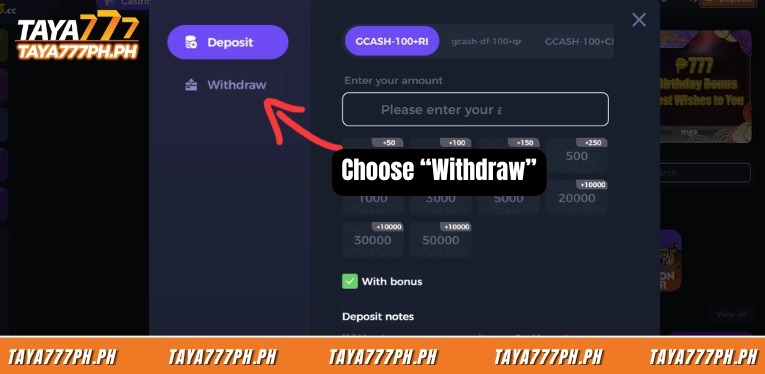
Step 1: Open the Withdraw section
Log in and find the Withdraw button inside the Deposit window on the top bar. Select the Withdraw tab in the window that appears. This is also where you declare your payout account – there’s no need to look for a separate “add bank” page.
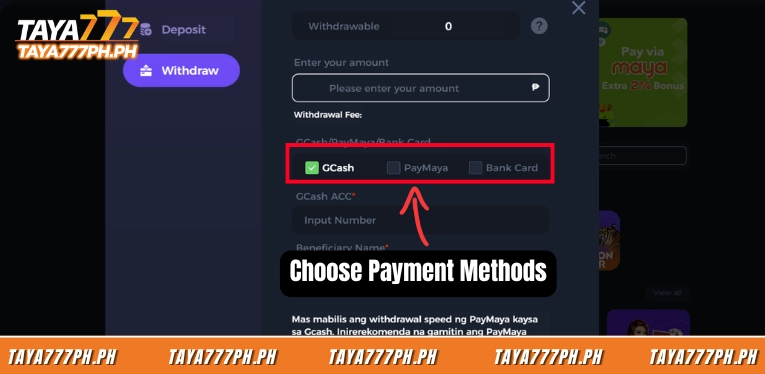
Step 2: Choose the payout channel
On the GCash/PayMaya/Bank Card row, tick the channel you want to receive funds through. For e-wallets, choose GCash/PayMaya; for a traditional bank, choose Bank Card. Each channel shows a different set of fields, so pick the right one from the start to avoid entering the wrong details.
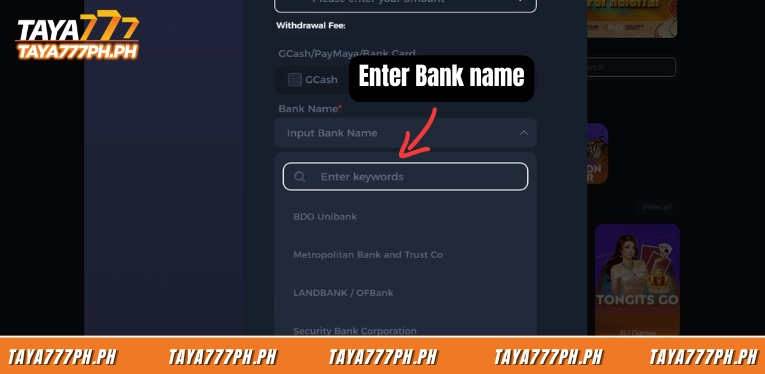
Step 3: Select a bank from the list
If you withdraw via Bank Card, open Bank Name and select the correct bank. You can type a keyword to search quickly. This is a fixed list – you can’t manually enter a bank outside of it.
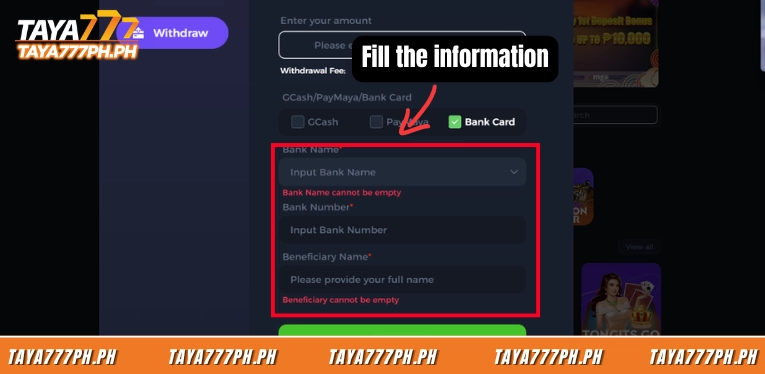
Step 4: Enter the account number and recipient name
Enter the Bank Number and Beneficiary Name. For GCash/PayMaya, the ACC field is the e-wallet’s phone number. The recipient name must match your bank passbook/app exactly to avoid having the request held.
Step 5: Enter the amount and confirm
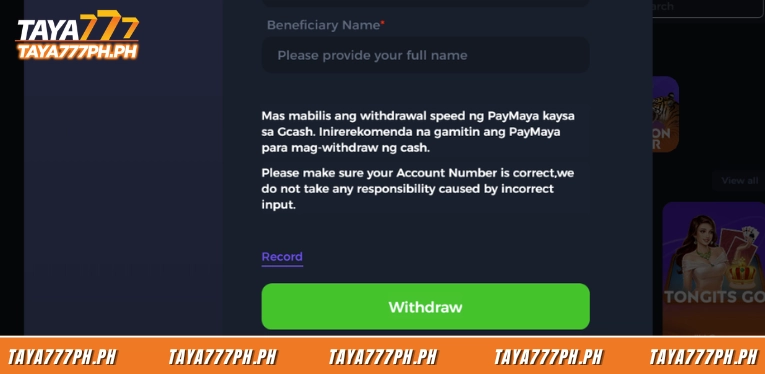
Enter the amount in the “Please enter your amount” field, double-check one last time, then tap the green Withdraw button. The system checks your balance and wagering conditions before processing. It’s best to take a screenshot for your records.
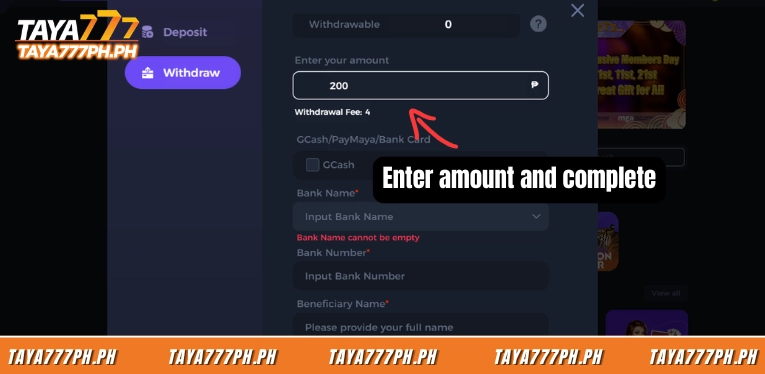
Note: Taya777 requires you to enter your payout details at the very moment of withdrawal. So “linking a bank” here actually means accurately declaring the payout account in each withdrawal request, and the recipient name must match the registered account holder for the request to be approved.
3 payout channels: GCash, PayMaya, and Bank Card
Taya777 supports 3 payout channels with different information fields, and the two e-wallets are usually processed faster than bank transfers. The table below summarizes the information you need to enter for each channel:
| Payout channel | Required fields | Characteristics |
| GCash | GCash ACC (e-wallet phone number), Beneficiary Name | Most popular in the Philippines, quick to use |
| PayMaya | PayMaya ACC (+63 + wallet number), Beneficiary Name | The system suggests it is faster than GCash for cash withdrawals |
| Bank Card | Bank Name, Bank Number, Beneficiary Name | Suitable for large amounts; funds usually take longer than e-wallets |
For GCash and PayMaya, the ACC number is the phone number registered to the wallet, not a separate string of digits. PayMaya already has the +63 country code at the front, so you only enter the remaining digits. One detail worth noting: Taya777 recommends using PayMaya for faster withdrawals than GCash, so if you prioritize speed, PayMaya is the sensible choice.
List of banks supported by Taya777
Taya777 currently supports many domestic Philippine banks, including most of the largest and most popular ones.
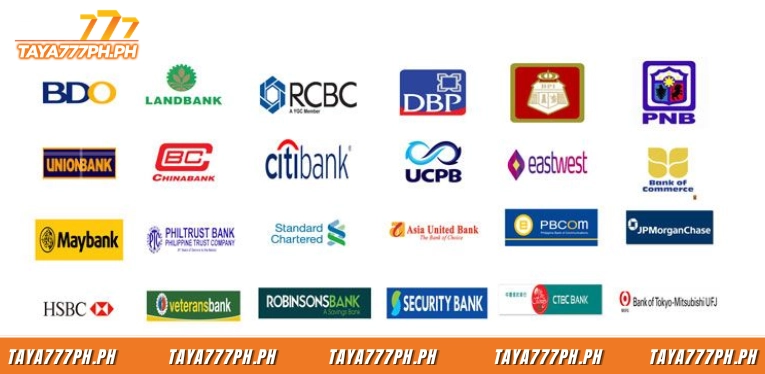
| # | Bank name | Common name |
| 1 | BDO Unibank | BDO |
| 2 | Metropolitan Bank and Trust Co | Metrobank |
| 3 | LANDBANK / OFBank | Landbank |
| 4 | Security Bank Corporation | Security Bank |
| 5 | Union Bank of the Philippines | UnionBank |
| 6 | Philippine National Bank | PNB |
| 7 | China Banking Corporation | Chinabank |
| 8 | East West Banking Corporation | EastWest |
| 9 | RCBC / DiskarTech | RCBC |
| 10 | United Coconut Planters Bank | UCPB |
| 11 | Philippine Savings Bank | PSBank |
| 12 | Asia United Bank Corporation | AUB |
| 13 | Philippine Bank of Communications | PBCOM |
| 14 | Development Bank of the Philippines | DBP |
| 15 | ALLBANK | ALLBANK |
4 tips to link your bank card successfully on the first try
Most rejected withdrawals come from incorrect payout details, not from system errors. There are 4 points to check carefully before tapping Withdraw:
- The recipient name must match exactly: The Beneficiary Name field needs to match the full name on your bank account or e-wallet. A Taya777 account under name A but withdrawing to a wallet under name B is usually held for review, since this is also a basic anti-money-laundering step.
- Complete KYC before withdrawing: Your account needs full identity verification (KYC) for a withdrawal to be processed smoothly. If you skip this step, the request may be stuck in a pending state until you submit the documents.
- Check the account number twice: Taya777 clearly states that the platform is not responsible for incorrect transactions caused by the user entering the wrong account number. Funds mistakenly sent to someone else’s valid number are almost impossible to recover, so verifying every digit is a must.
- Watch the withdrawal fee and limits: The screen has a Withdrawal Fee section showing the applicable fee, along with minimum/maximum limits that vary by account type and withdrawal channel. Instead of guessing, read the figures displayed at the moment of withdrawal to calculate exactly how much you will receive.
Common linking errors and how to fix them
When linking a bank or wallet to Taya777, players often run into a few familiar errors, most of which can be fixed in a few minutes:
| Error encountered | Cause | How to fix |
| “Bank Name cannot be empty” | No bank selected from the list | Open the Bank Name dropdown, choose the correct bank, then re-enter the account number |
| Withdrawal rejected / refunded | Wrong account number or recipient name | Re-check the Bank Number and Beneficiary Name against your banking app |
| Request stuck in pending | KYC not completed or promo wagering conditions not met | Complete identity verification; if withdrawing bonus funds, finish the wagering requirement first |
| Funds not received after approval | The bank channel processes slower than wallets | Wait per the channel’s processing time; prioritize PayMaya/GCash next time |
The Taya777 link bank account setup isn’t complicated once you understand the process. Players only need to choose a channel (GCash, PayMaya, or one of the supported banks), enter the correct account number and recipient name, then confirm. The two factors that decide a successful withdrawal are an exactly matching recipient name and completed KYC. For those who prioritize speed, e-wallets – especially PayMaya – remain the fastest option. All information is compiled from the official Taya777 platform. Players should review it carefully before making any transaction.

Barbie Imperial is a Senior Content Strategist at TAYA777, specializing in online casino news, detailed gaming guides, and sports betting insights for the Philippine market. With a proven track record in the iGaming industry, she is committed to providing reliable, accurate information that helps players bet with clarity and confidence.