
The Taya777 app delivers a smoother gaming experience compared to a mobile browser, optimised for smartphone hardware and equipped with exclusive features including biometric login, promotional push notifications and quick access to the full game library.
- Android players install an APK file of approximately 45MB requiring Android 5.0 or higher, while iOS players access the platform as a PWA via Safari using the Add to Home Screen option.
- The app supports biometric login via fingerprint or face recognition, push notifications for promotions, instant deposits and withdrawals via GCash and PayMaya, and full access to the live casino, slot, sabong and sports game library.
- Players should download the app from the official channel to receive the installation reward and avoid fake APK files from untrusted sources that may pose security risks to the device and account.
How to download the Taya777 app on Android
Android players have three ways to download the Taya777 app, all leading to the same official APK file. Here are the detailed steps:
Step 1: Open the main interface and locate the APP Download button
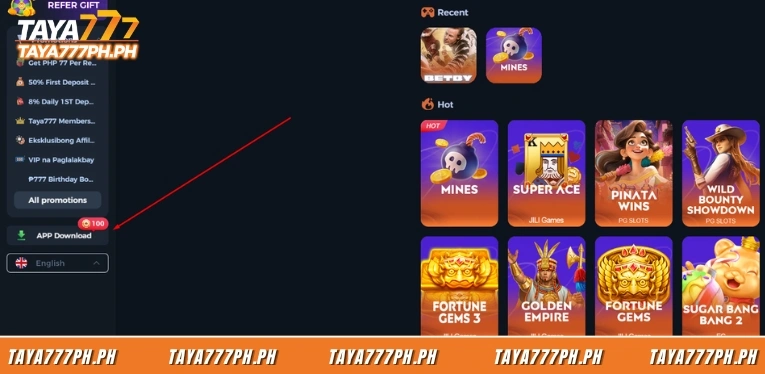
Players log in to their account and look at the left menu on the main interface. The APP Download button is at the bottom of the menu, just below the All promotions section, with a red badge showing the number 100. Players click the APP Download button to open the download area.
Step 2: Scan the QR code to download the APK file
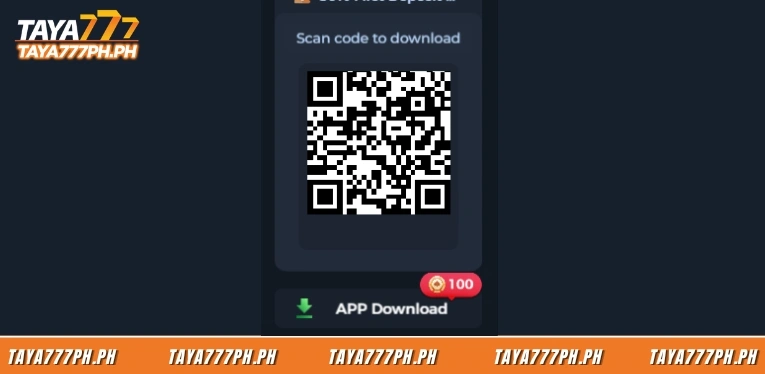
After clicking APP Download, the system displays a QR code with the text Scan code to download. Players use their phone camera or a QR scanner app to scan the code, then tap the download link that appears to get the APK file. This is the fastest way to transfer the download link from a desktop screen to a phone.
Step 3: Allow installation from unknown sources
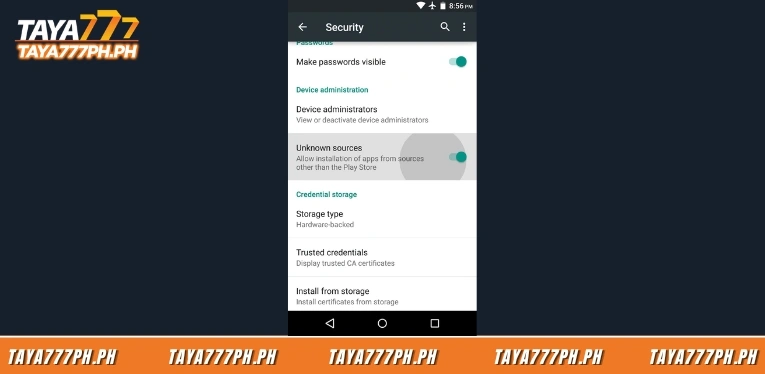
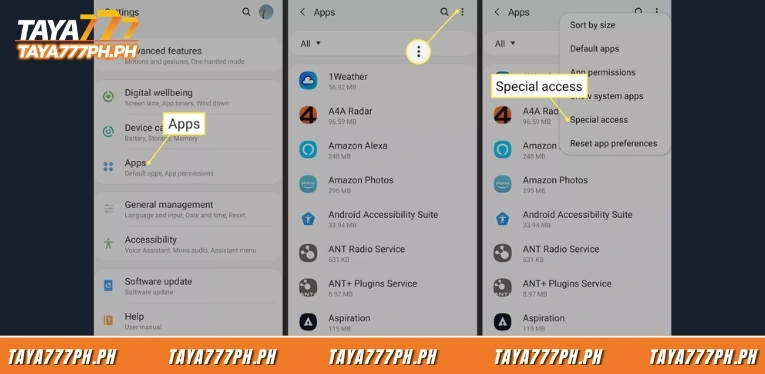
Before opening the APK file, players go to the security settings on their device and enable installation from unknown sources. This step is required for any APK installed outside of Google Play and players can turn it off again after installation is complete.
Step 4: Install and log in
Players open the downloaded APK file, tap Install and wait a few seconds for the installation to finish. Once installed, players open the app and log in using the registered phone number and password, following the same process as on the web browser.
How to install the Taya777 app on iOS
iOS devices cannot install APK files and the Taya777 app is not available on the App Store, so players access the platform as a PWA through the Safari browser. The PWA works similarly to a native app, displaying an icon on the home screen and opening directly without going through a browser.
Step 1: Open Taya777 in Safari and tap the share button
Players open the Safari browser on their iOS device and go to the official Taya777 website. Once the page loads, players tap the share icon, which looks like an arrow pointing upward, located in the toolbar at the bottom of the screen.
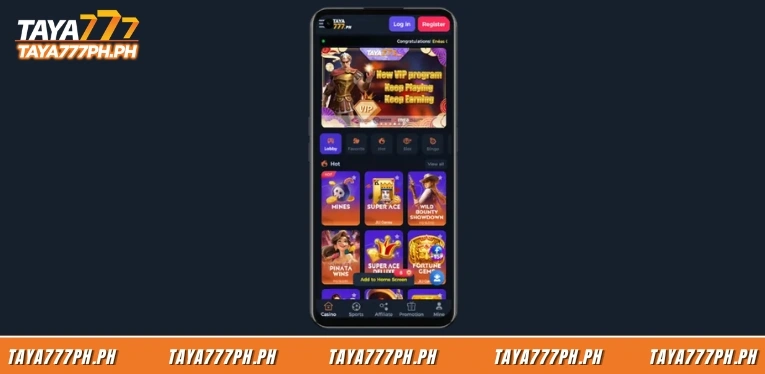
Step 2: Select Add to Home Screen
In the share menu that appears, players scroll down and select Add to Home Screen. The system creates a Taya777 icon on the home screen and players tap this icon to open the platform as a standalone app and log in as usual.

Key features of the Taya777 app
The Taya777 app includes all features from the web version plus several mobile-specific tools.
- Biometric login allows players to unlock their account via fingerprint or face recognition for faster and more secure access compared to entering a password manually.
- Push notifications deliver new promotions, events and bonuses directly to the device without needing to open the app.
- Instant deposits and withdrawals via GCash and PayMaya are optimised in the app with a simpler process.
- Full game library access includes slots, live casino, sabong, fishing, bingo and sports.
- Lower data consumption compared to mobile web browsing thanks to resource optimisation.
Common Taya777 app installation errors and how to fix them
Some players may encounter issues when downloading or installing the Taya777 app. This section covers common errors and the corresponding solutions.
- APK will not install: This is usually caused by the unknown sources permission not being enabled. Players go to the security settings on their device, enable the permission and then open the APK file again.
- Downloaded APK is corrupted or will not open: Players delete the downloaded file, check their network connection and download again using the official QR code or APP Download button, avoiding any third-party sources.
- iOS app cannot be added to the home screen: This happens when players use a browser other than Safari. The Add to Home Screen feature only works in Safari, so players need to open the platform in Safari instead of Chrome or any other browser.
- App runs slowly or lags: Players check available storage on their device, close background apps and make sure the app is updated to the latest version. Restarting the device also resolves most performance issues.
Frequently asked questions about the Taya777 app
Below are common question when downloading Taya777 app:
Where is the safe place to download the Taya777 app?
Players download the Taya777 app via the APP Download button or QR code on the official platform interface. This is the only safe download source and players should avoid APK files from third-party websites to prevent security risks.
Is the Taya777 app available on the App Store?
No. Taya777 is not on the App Store because Apple’s policy does not support real-money gambling apps in the Philippines. iOS players access the platform as a PWA via Safari using the Add to Home Screen option.
Do players get a reward for downloading the Taya777 app?
Yes. Players who download the app for the first time receive an installation reward, shown as the number 100 badge on the APP Download button in the main interface.
What are the device requirements for the Taya777 app?
The Android app is approximately 45MB and requires Android 5.0 or higher. iOS devices only need the Safari browser to run the PWA version with no installation storage required.
Why is Taya777 not on Google Play?
Google Play does not allow real-money gambling apps to be distributed in the Philippines market, so Taya777 provides the APK file as a direct download from the official website. This is a common approach for iGaming platforms in the region.
The Taya777 app supports both Android via an APK file of approximately 45MB and iOS as a PWA through Safari, delivering more stable performance along with exclusive features including biometric login and promotional notifications. Players download the app via the official APP Download button or QR code to receive the installation reward and stay secure, and must enable installation from unknown sources on Android to complete the process.

Barbie Imperial is a Senior Content Strategist at TAYA777, specializing in online casino news, detailed gaming guides, and sports betting insights for the Philippine market. With a proven track record in the iGaming industry, she is committed to providing reliable, accurate information that helps players bet with clarity and confidence.