Deposit Taya777 is a mandatory step for players to join the betting action and use every feature on the system. Although the process is simple and takes only a few basic actions, many newcomers still run into trouble because they are not yet familiar with it. In reality, most deposit errors – slow processing, missing bonuses, or failed deposits – come from small mistakes made during the process.
- Optimized and simple process: Depositing into Taya777 is clearly standardized across 6 steps, from login to funds landing in the account, making it easy for players to follow.
- Easy preparation requirements: Players only need a successfully registered Taya777 account and a GCash or Maya e-wallet account with enough balance to complete the transaction.
- Diverse, fee-free deposit channels: The platform supports up to 14 flexible deposit channels across 3 major wallet groups (GMpay, GCash, Maya), with a low minimum limit (from 100 PHP) and absolutely no transaction fees.
Deposit Taya777 in 6 steps
The Deposit Taya777 process consists of 6 steps, from login to funds landing in the account. Players only need a registered Taya777 account and a GCash or Maya wallet with enough balance.
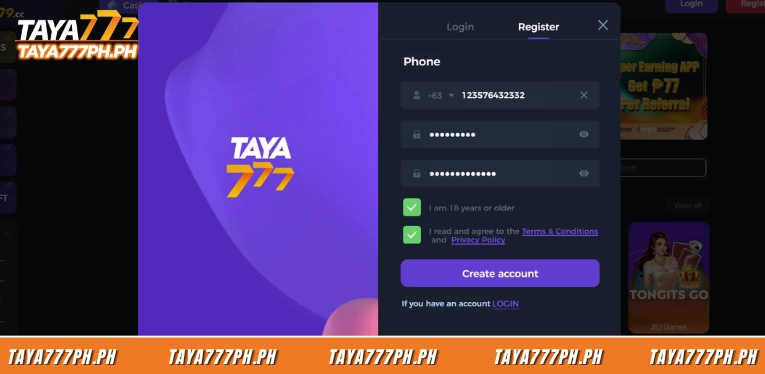
Step 1: Log in to your Taya777 account
Visit the official Taya777 homepage and log in using a Philippine phone number in the +63 format along with the password you created. Accounts that are not yet registered will not have a deposit button, so new players need to complete registration first.
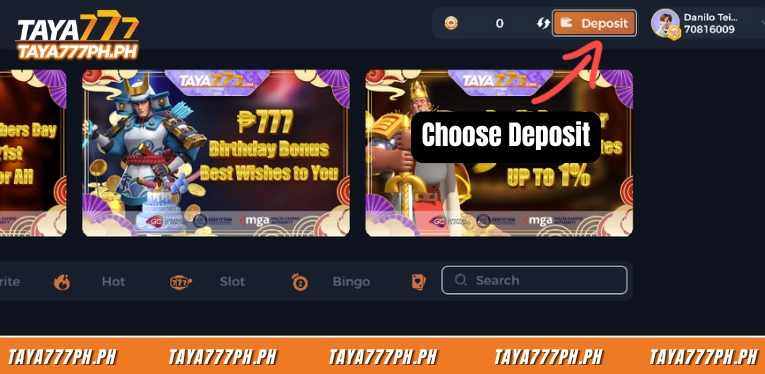
Step 2: Open the Deposit section
After logging in, click the orange Deposit button at the top right of the interface, right next to the coin balance and account information. A payment window appears with two tabs: Deposit and Withdraw. The Deposit tab is pre-selected so you can start depositing.
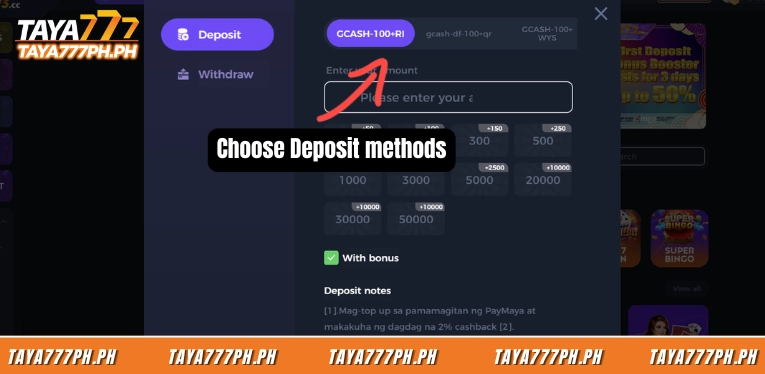
Step 3: Choose a payment channel
Choose one of the channels shown in the top row of the deposit window, including GMpay, the GCash channels, and the Maya channels. Each channel is a separate processing gateway. So if one channel returns an error or is under maintenance, players can switch to another channel within the same wallet type. The Maya channels usually display an extra 2% cashback label right above the channel name.
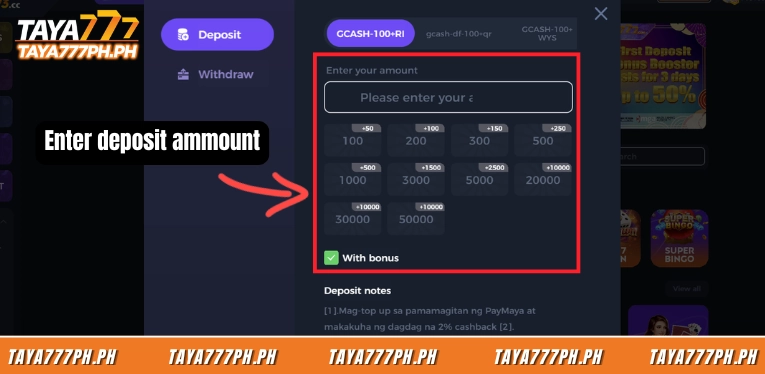
Step 4: Enter the amount and enable With bonus
Enter the amount in the Enter your amount box, or quickly select a preset value such as 100, 200, 300, 500, 1000, 2000, 3000, 5000, 10000, 20000, 30000, or 50000 PHP. Each value shows its corresponding bonus. The With bonus box must be checked green if players want to receive the deposit bonus.
Step 5: Confirm and pay via your wallet
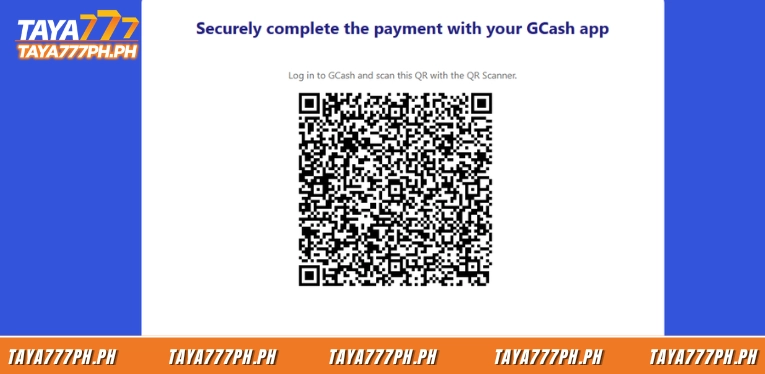
Click the large Deposit button at the bottom of the window to confirm. The system switches to the payment page of the selected wallet; for example, GCash will show an Open in GCash button along with a QR code. Players open the GCash app to pay directly or scan the QR code with a QR Scanner. Each QR code is also valid for one transaction only.
Step 6: Check the status in Record
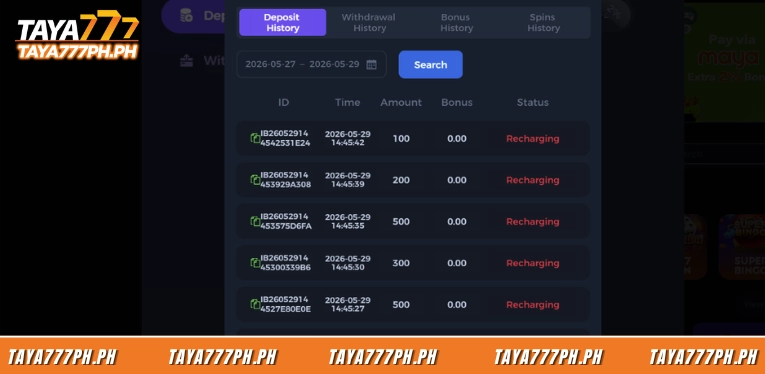
After paying, open the Record section in the deposit window to track the transaction in the Deposit History tab. The history table shows the transaction ID, time, amount, bonus level, and status. A transaction in progress will sit at the Recharging status, then switch to successful once the funds land in the account, usually within a few minutes.
All currently available Deposit Taya777 channels
Taya777 displays 14 deposit channels across three wallet groups – GMpay, GCash, and Maya – all starting from 100 PHP with no transaction fees charged by the platform. The table below lists every channel currently available on the deposit interface.
| No. | Channel name | Wallet group | Minimum limit | Notes |
| 1 | GMpay | GMpay | 100 PHP | Full set of fast-deposit values up to 50000 PHP |
| 2 | GCASH-H5-100+TP | GCash | 100 PHP | Payment via GCash QR code |
| 3 | gcash-df-100+qr | GCash | 100 PHP | Payment via GCash QR code |
| 4 | GCASH-100+WYS | GCash | 100 PHP | Payment via GCash QR code |
| 5 | GCASH-100+RI | GCash | 100 PHP | Payment via GCash QR code |
| 6 | GCASH-100+ki | GCash | 100 PHP | Payment via GCash QR code |
| 7 | GCASH-100+789 | GCash | 100 PHP | Payment via GCash QR code |
| 8 | GCASH-100+CE | GCash | 100 PHP | Payment via GCash QR code |
| 9 | Y-GCASH-100+ | GCash | 100 PHP | Payment via GCash QR code |
| 10 | GCASH-100+CK | GCash | 100 PHP | Payment via GCash QR code |
| 11 | gcash-100+g | GCash | 100 PHP | Payment via GCash QR code |
| 12 | Maya-B | Maya | 100 PHP | Extra 2% cashback |
| 13 | Maya-D | Maya | 100 PHP | Extra 2% cashback |
| 14 | MAYA-100+L | Maya | 100 PHP | Extra 2% cashback |
Deposit Taya777 limits and processing times
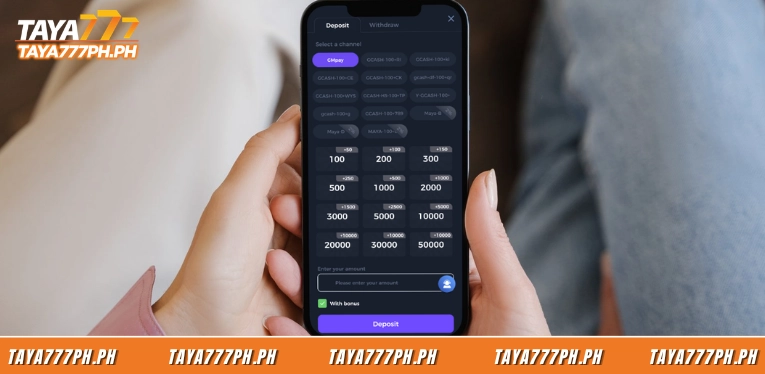
All 14 deposit Taya777 channels share the same minimum limit of 100 PHP. The highest preset fast-deposit amount shown is 50000 PHP per transaction, with no fees charged by the platform. The difference lies in the preset fast-deposit values built into each wallet group. These include:
| Wallet group | Minimum limit | Preset fast-deposit values | Maximum | Fee | Processing speed |
| GMpay | 100 PHP | 100, 200, 300, 500, 1000, 2000, 3000, 5000, 10000, 20000, 30000, 50000 | 50000 PHP | 0% | 1 to 3 minutes |
| GCash | 100 PHP | 100, 200, 300, 500, 1000, 3000, 5000, 20000, 30000, 50000 | 50000 PHP | 0% | 1 to 3 minutes |
| Maya | 100 PHP | 100, 200, 300, 500, 1000, 3000, 5000, 10000, 20000, 50000 | 50000 PHP | 0% | 1 to 3 minutes |
Common deposit errors and how to fix them
Most Deposit Taya777 issues come from the payment action rather than a system error. Below are the 6 most common errors, along with how to handle each case.
- Payment amount does not match: This is the top error that prevents a transaction from being credited. The cause is that players transfer a number different from the one shown at the payment gateway. The fix is to enter every digit correctly and double-check the amount on the wallet app before pressing confirm.
- Re-scanning a used QR code: Each QR code is valid for one transaction only, so reusing it returns an error. This often happens when players try to deposit a second time with the old code. The fix is to go back to the Deposit section and create a new deposit order so the system issues a different QR code.
- Funds deducted but account not credited: The wallet balance is deducted while play points have not yet appeared, usually because the wallet is busy with transactions. At this point the transaction is still at the Recharging status, not failed. The fix is to wait a few more minutes, keep the receipt screenshot from GCash or Maya, then contact online support to reconcile if it takes too long.
- Deposit bonus not received: Players deposit successfully but cannot find the 50% bonus anywhere. The cause is almost always forgetting to check the With bonus box before confirming. The fix is to make sure the With bonus box is in the green state from the start, because the bonus cannot be added back after the transaction is complete.
- Payment gateway returns an error or maintenance: A specific channel cannot load the QR page or keeps failing. This is usually because that gateway is overloaded or temporarily under maintenance, not an account error. The fix is to switch to one of the remaining gateways in the same wallet group – for example, changing from GCASH-H5 to GCASH-100+CK.
- Wallet not verified or insufficient balance: The transaction is rejected as soon as the GCash or Maya payment page opens. The cause is that the wallet has not completed KYC verification or the balance is lower than the deposit amount. The fix is to fully verify the wallet and ensure the balance is greater than or equal to the intended deposit value before proceeding.
Deposit Taya777 is an extremely convenient and fast process, with transaction processing speeds of just 1 to 3 minutes. With a limit from 100 PHP and offers such as a 50% first-deposit bonus or 2% cashback via Maya. Most issues that arise usually come from mistakes in the user’s actions rather than the system. Therefore, to make sure funds reach the account smoothly and to receive the full offers, players only need to take care to enter the correct amount and use a new QR code for every deposit. All information is compiled from the official Taya777 platform. Players should review carefully before making any transaction.

Barbie Imperial is a Senior Content Strategist at TAYA777, specializing in online casino news, detailed gaming guides, and sports betting insights for the Philippine market. With a proven track record in the iGaming industry, she is committed to providing reliable, accurate information that helps players bet with clarity and confidence.