GCash is currently one of the most preferred payment methods at Taya777 thanks to its convenience and fast processing speed. However, many players still run into interrupted transactions simply because of small mistakes during the process. Mastering the key points in this Taya777 GCash deposit guide helps you complete transactions accurately and safely.
- A quick 5-step process: With just simple actions from opening the Deposit section, choosing a channel, entering the amount, to scanning the QR code. Players can complete a GCash deposit with a minimum of ₱100.
- Maximize the 50% first-deposit offer: The system provides a 50% bonus program with a cap of up to ₱10.000. Among the tiers, the ₱20.000 deposit is the ideal choice to fully exploit the bonus.
- Proactively prevent transaction errors: Taya777 supports up to 10 backup GCash channels to spread the load; players should make sure to scan the exact amount the system provides, not close the QR page too early, and capture the receipt for reconciliation when needed.
Taya777 GCash deposit guide in 5 steps
The GCash deposit process consists of 5 simple steps. Players just need to follow each step and funds can be deposited into a Taya777 account easily.
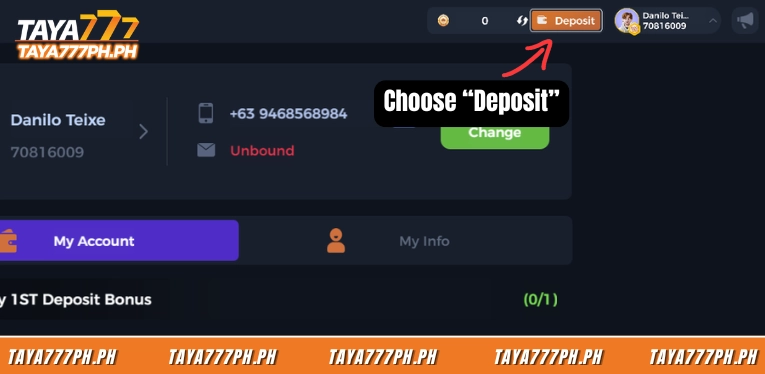
Step 1 – Open the Deposit section
After logging in, the Deposit button sits in the middle of the top toolbar (next to the balance). If the account shows an Unbound status in the information section, players should link a phone number first to avoid interruptions during transaction reconciliation later.
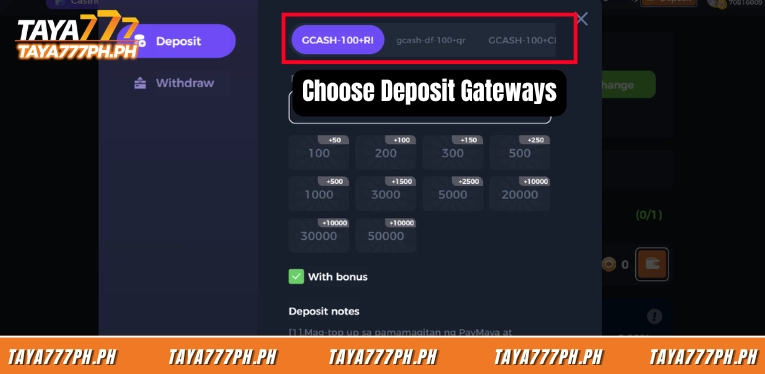
Step 2 – Choose the right GCash channel
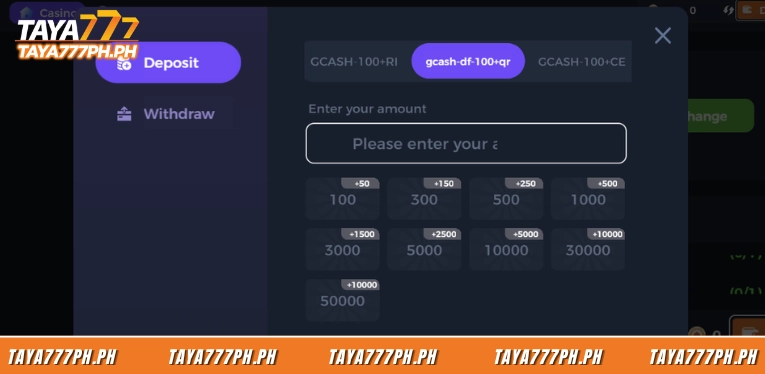
At the top of the deposit window there is a row of channel tabs such as GCASH-100+RI, gcash-df-100+qr, GCASH-100+CE and many others. These are all GCash payment gateways, differing only in the intermediary processor. Players simply need to choose a channel that is operating normally.
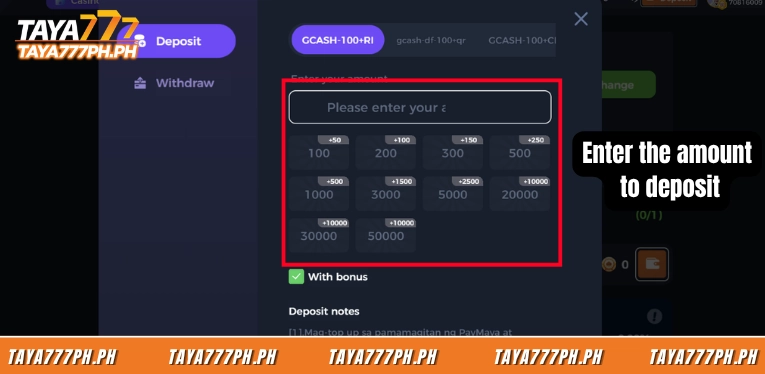
Step 3 – Enter the amount
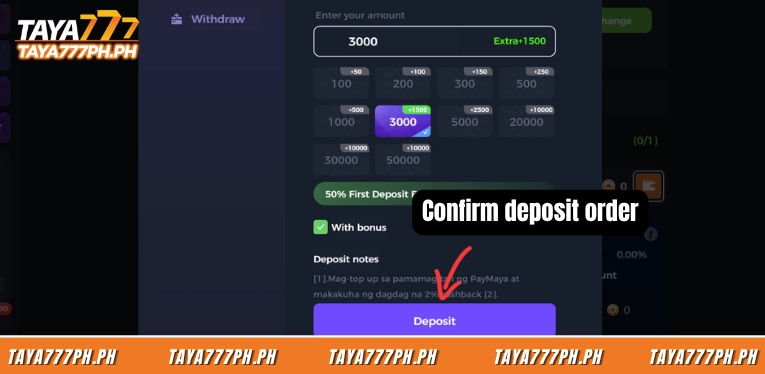
Type the amount into the “Enter your amount” box, or tap a quick denomination such as 100, 200, 500, 1.000. When the With bonus option is enabled, the system displays the accompanying bonus right above the input box; for example, depositing ₱200 shows the line Extra +100 and the 50% First Deposit Bonus banner.
Step 4 – Confirm the deposit order
Tap the purple Deposit button at the bottom of the window. The system switches to the official GCash payment page for players to proceed with the payment.
Step 5 – Scan the QR and complete
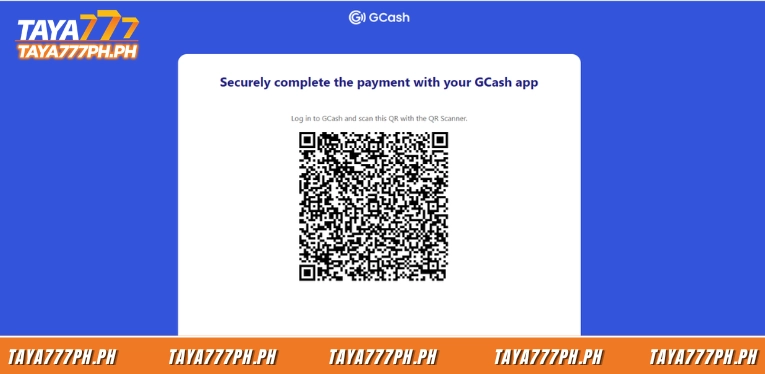
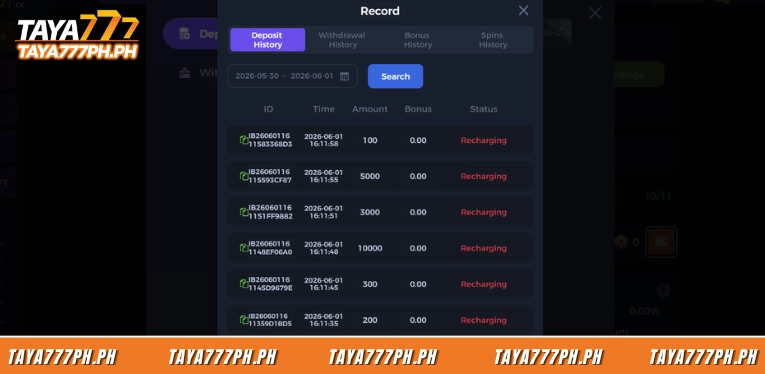
Open the GCash app, use the QR Scanner function to scan the code shown on the screen, check the amount, then confirm. After GCash deducts the funds, the transaction will appear in the deposit history with a processing status.
Minimum deposit and bonus tier table
The minimum GCash deposit is ₱100, which is also the smallest quick denomination in the Deposit window. When With bonus is enabled, each denomination comes with a fixed bonus at a 50% rate, capped at +₱10.000.
| Deposit amount (₱) | Accompanying bonus (₱) | Actual rate |
| 100 | +50 | 50% |
| 200 | +100 | 50% |
| 300 | +150 | 50% |
| 500 | +250 | 50% |
| 1.000 | +500 | 50% |
| 3.000 | +1.500 | 50% |
| 5.000 | +2.500 | 50% |
| 20.000 | +10.000 | 50% (cap reached) |
| 30.000 | +10.000 | ~33% (cap reached) |
| 50.000 | +10.000 | 20% (cap reached) |
Note: The bonus stays at a 50% rate up to the ₱20.000 deposit mark. From ₱30.000 and above, the bonus is limited to ₱10.000, so the actual rate received gradually decreases. For first-time depositors, the ₱20.000 mark is the optimal point to fully exploit the 50% bonus cap.
Common TAYA777 GCash deposit errors and how to fix them
Most issues when depositing via GCash come from user actions rather than system errors. Five common situations and how to handle them are as follows.
- Transferred amount does not match the created order: This is the most common error that prevents a transaction from being recorded automatically. The amount scanned via QR must exactly match the amount entered in the Deposit window.
- Closing the QR page before confirming: Exiting early means the system does not receive the payment result. Keep the QR page open until GCash reports a successful transaction.
- QR code expired: Each QR code is only valid for a short period. Waiting too long to scan causes the code to expire, in which case you must go back and create a new deposit order.
- Account not linked (Unbound): An unlinked phone number status can cause snags during transaction reconciliation. Complete the linking before making the first deposit order.
- GCash channel overloaded or under maintenance: Some channels may temporarily fail to generate a QR code. The simplest solution is to go back and choose another GCASH-100+ channel from the list.
TAYA777 GCash deposit gateways supported
The Deposit tabs are all different GCash payment gateways. Having multiple channels serves two purposes: spreading the transaction load and providing a backup option. When a channel reports an error, fails to generate a QR code, or is under maintenance, players simply go back and choose another GCash channel from the list, then repeat the process from the start. As of the time of compilation, the interface displays 10 GCash channels as follows.
| Channel name | Notes | |
| 1 | GCASH-100+RI | Default channel shown at the top of the list |
| 2 | gcash-df-100+qr | Direct QR-type channel |
| 3 | GCASH-100+CE | Standard gateway |
| 4 | GCASH-100+ki | Standard gateway |
| 5 | GCASH-100+CK | Standard gateway |
| 6 | Y-GCASH-100+ | Y-prefix variant |
| 7 | gcash-100+g | Standard gateway |
| 8 | GCASH-100+WYS | Standard gateway |
| 9 | GCASH-H5-100+TP | Channel running on the H5 platform |
| 10 | GCASH-100+789 | Standard gateway |
5 safe deposit tips and important notes
A few habits help the deposit process go more smoothly and safely. Players should also keep these tips in mind so the deposit process runs more smoothly.
- Enter the correct amount and match it with GCash: Always check that the amount on the deposit order matches the amount scanned in the GCash app. Even a small discrepancy can prevent the transaction from being automatically credited to the balance.
- Capture the receipt after each deposit: A screenshot of the GCash transaction is important proof for reconciliation. When a check is needed, the receipt along with the transaction code makes processing much faster.
- Prioritize depositing during supported hours: Depositing while the customer support team is online helps issues get resolved promptly if an error arises. Avoid depositing late at night when response times are slower.
- Consider whether to turn With bonus on or off: Turn it on to receive the bonus but accept the accompanying wagering requirement. Turn it off if you want a clean deposit and flexible withdrawals without bonus restrictions.
- Read the wagering requirement carefully before claiming the bonus: Each bonus usually requires completing a certain wagering round. Understanding this requirement before claiming helps avoid misunderstandings when withdrawing.
A Taya777 GCash deposit is a short process of 5 steps, with a minimum of ₱100 and funds reaching the account within a few minutes. The points to remember include: the 50% first-deposit bonus has a ₱10.000 cap and is paid in daily batches, the GCASH-100+ channels can substitute for one another when an error occurs, and the Recharging status is only a temporary processing step. When a transaction is slow to update, the transaction code together with the GCash receipt is the fastest reconciliation tool with the support team. This information is compiled from the official Taya777 platform. Players should review it carefully before making any transaction.

Barbie Imperial is a Senior Content Strategist at TAYA777, specializing in online casino news, detailed gaming guides, and sports betting insights for the Philippine market. With a proven track record in the iGaming industry, she is committed to providing reliable, accurate information that helps players bet with clarity and confidence.