
For members at Taya777 Philippines, account verification is a mandatory procedure that protects their legal rights and ensures transparency when transacting. In practice, quite a few players have had their withdrawals interrupted simply because of small oversights in completing their profile. So how do you complete Taya777 account verify in the Philippines as accurately as possible?
- Optimized 4-layer security process: Taya777 account verify includes 4 strict steps (phone number OTP, email linking, a standard-compliant password, and KYC verification) that protect the account comprehensively right from registration.
- Strict withdrawal conditions: To disburse successfully, the name registered on the system must match exactly the name on the e-wallet (GCash/Maya). At the same time, the account must complete all wagering requirements in full.
- Proactive prevention of transaction errors: Most common issues — such as not receiving the OTP, a password format error, or an unlinked email (“Unbound”) — can be fixed quickly on your own by using your own genuine information.
How to do Taya777 account verify in the Philippines?
The Taya777 account verify process consists of 4 layers corresponding to 4 steps, moving from basic identification to identity verification at withdrawal.
| Verification layer | Purpose | When it is needed |
| Phone number (OTP) | Primary identification, login on any device | Right at registration |
| Email linking | Recovery & secondary authentication | Optional, recommended early |
| Standard-compliant password | Access protection | At registration |
| KYC (ID documents) | Identity verification for withdrawal | Before the first withdrawal, contact via Live Chat |
Verify your phone number with an OTP code
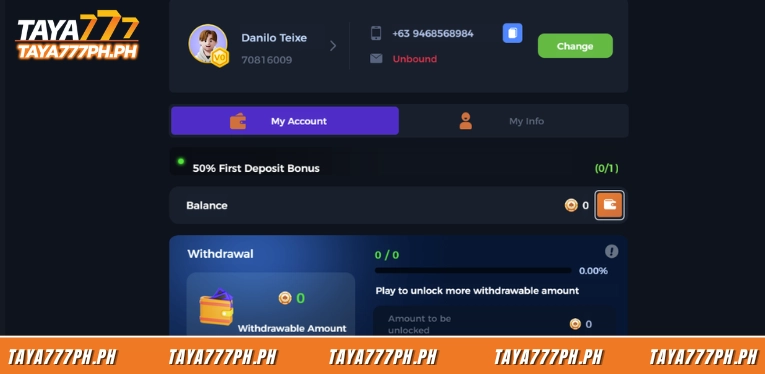
The phone number is the most important identification layer on Taya777 and is authenticated through an OTP code sent by SMS. When registering, players enter a mobile number starting with the country code +63, the system sends a one-time code to the device, then they enter this code in the Security Center to link the number to the account. When successful, the Mobile Number field in Account Setting switches to a green “Verified” label.
A verified phone number allows login from any device and is the channel for receiving OTPs for later withdrawal requests. For this reason, you should use your own genuine number that is active and can access SMS — do not use a virtual number or a temporarily borrowed one.
Link your email
Linking an email and setting a strong password are two additional protection layers that many players skip. The email field shows “Unbound” (not linked) by default. Linking an email address creates an extra recovery channel and a backup channel for receiving authentication codes when an OTP does not arrive via SMS. This layer is especially useful if the phone number temporarily loses signal or messages are blocked.
Confirm your password and KYC
For the password, the system requires a length of 6–16 characters and accepts both letters and numbers. A password combining uppercase letters, lowercase letters, and numbers is safer than a plain numeric string. Avoid reusing a password already used for your GCash wallet or personal email to reduce the risk of cross-exposure of information.
For KYC verification, players need to contact the support team via Live Chat. They then provide the required documents, and the profile is reviewed and approved within 24 hours.
Why does a registered account still need verification to withdraw?
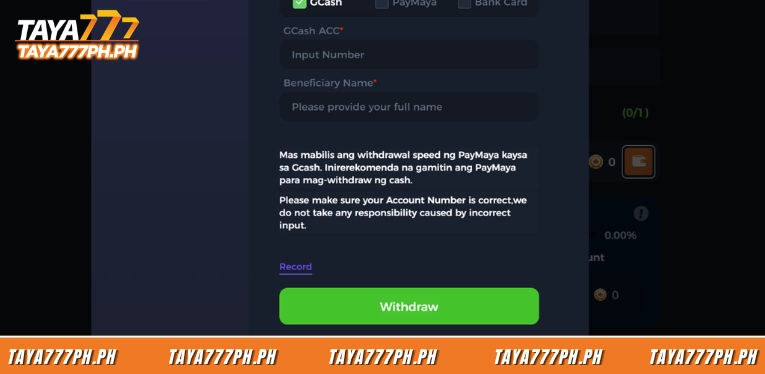
A registered account can still be blocked from withdrawing if it has not been fully verified, because Taya777 applies KYC and requires wagering before disbursement. On the wallet interface, the Withdrawal section often displays progress in the form of “0.00%” along with the line “Play to unlock more withdrawable amount.” This means the amount available to withdraw is only unlocked after the wagering requirement (turnover/wagering) is met. If a player has received a promotion such as the “50% First Deposit Bonus,” that reward carries a wagering condition that must be completed before withdrawal.
Besides wagering, the three remaining barriers are: incomplete KYC, a name that does not match the receiving wallet, and exceeding the 24-hour withdrawal limit. The system automatically rejects a request that exceeds the daily limit without prior notice, so you need to check the remaining limit before creating each request.
Information matching rules and KYC
KYC on Taya777 requires valid identity documents and forces the account name to match the name on the withdrawal wallet. When creating the first withdrawal request, the system usually requires a government-issued ID to confirm identity, alongside the verified phone number. This is the step that distinguishes a valid account from accounts that are registered but not yet identified.
The most important rule at this stage is that the name registered on Taya777 must match exactly the name of the GCash or Maya account holder used to receive the money. A mismatched name — even a single wrong character — usually causes the transaction to be rejected. For the same reason, the wallet or bank account used for withdrawal should be the wallet used when depositing, to avoid the system blocking it because the account is not linked.
4 common Taya777 account verify errors and how to handle them
The four most common verification errors on the Taya777 platform all revolve around the OTP and information matching. Most of them can be handled in a few minutes without contacting the support team.
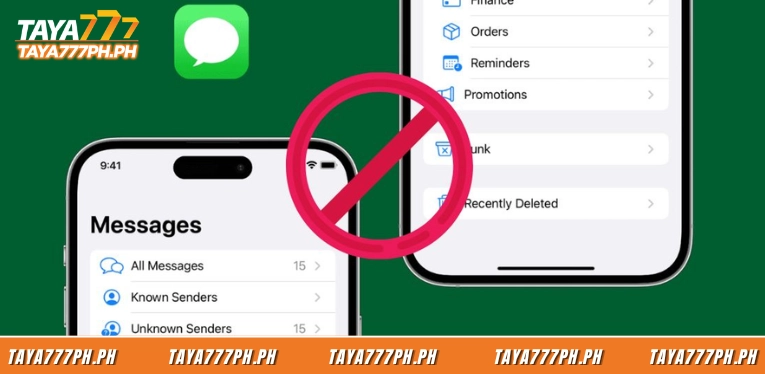
- Not receiving the OTP code: Common causes include: a number entered in the wrong format (missing the +63 country code), a message filtered by the carrier, or a code sent via email landing in the spam folder. Handle it in this order: recheck the linked phone number, open the spam/junk folder and mark the system’s message as safe, then press “resend” to generate a new code.
- Name does not match the receiving wallet: This error causes the withdrawal request to be rejected even though the account has verified its phone number. The system cross-checks the name registered on Taya777 against the GCash or Maya account holder name, and just one wrong character, a missing middle name, or different upper/lowercase is enough for the transaction to not be approved. The fix is to make sure the name on both sides matches exactly before creating the request.
- Email is still in “Unbound” status: An unlinked email does not block play, but it removes the backup authentication channel, leaving the player entirely dependent on SMS. When the phone number temporarily loses signal or messages are blocked, having no email means there is no alternative way to receive the OTP. Go to Account Setting, select the email field, and follow the linking steps to switch the status from “Unbound” to verified.
- Wrong password format: This error occurs when the password set does not meet the standard of 6–16 characters including both letters and numbers. A string that is too short, all numbers, or all letters is rejected by the system. Reset it according to the requirements and prioritize a combination of uppercase, lowercase, and numbers so that it is both valid and secure.
Tips to keep your Taya777 account as secure as possible
Securing a Taya777 account relies on controlling authentication codes, locking access with biometrics, and operating only on official channels. The tips below will help reduce the risk of losing the account and having withdrawal requests blocked:
- Do not share the OTP code with anyone: The OTP code is used to authenticate logins and withdrawal requests, so whoever has the code can operate on the account. A real support team never asks for the OTP, so any request to provide the code via message, email, or call is a sign of fraud.
- Enable biometric login: Activating fingerprint or Face ID in the app settings allows quick access without manually entering a password each time. This layer also blocks others from opening the account even if they know the password, while acting as a secondary authentication when an OTP does not arrive via SMS.
- Set a strong, unique password: The password should meet the 6–16 character standard, combining uppercase, lowercase, and numbers instead of a plain numeric string. Avoid reusing a password already used for your GCash wallet or personal email so that one leak does not lead to the risk of losing multiple accounts.
- Only access through the official domain: Every login and verification action should be performed on the official Taya777 platform, not through cloned pages or unfamiliar domains. This is where information theft commonly happens, so you should carefully check the address before entering a phone number, password, or OTP.
Taya777 account verify in the Philippines is a 4-layer process. Players need to verify their phone number via OTP, link an email, set a 6–16 character password, and complete KYC at withdrawal. Among these, having the account name match the wallet and completing the wagering requirements are the two conditions that determine a successful withdrawal. Completing all the steps from the start helps avoid blocked requests and shortens processing time to 5–15 minutes with an e-wallet. Every verification action should be performed on the official Taya777 homepage. Players should review carefully before participating.

Barbie Imperial is a Senior Content Strategist at TAYA777, specializing in online casino news, detailed gaming guides, and sports betting insights for the Philippine market. With a proven track record in the iGaming industry, she is committed to providing reliable, accurate information that helps players bet with clarity and confidence.