
Bank withdrawal is the right choice for Taya777 players making high-value transactions or those who do not use an e-wallet. The Bank Card method supports nearly 60 banks and financial institutions in the Philippines, from major commercial banks to digital banks and e-wallets. This guide covers the detailed Taya777 withdrawal to bank account process, the list of supported institutions and important notes to ensure the transaction goes smoothly.
- Taya777 bank withdrawals are carried out in the Withdraw section following five steps: enter the amount, select Bank Card as the method, choose the Bank Name from the dropdown, enter the Bank Number and a Beneficiary Name matching the registered name then click Withdraw. This method supports nearly 60 banks and financial institutions in the Philippines.
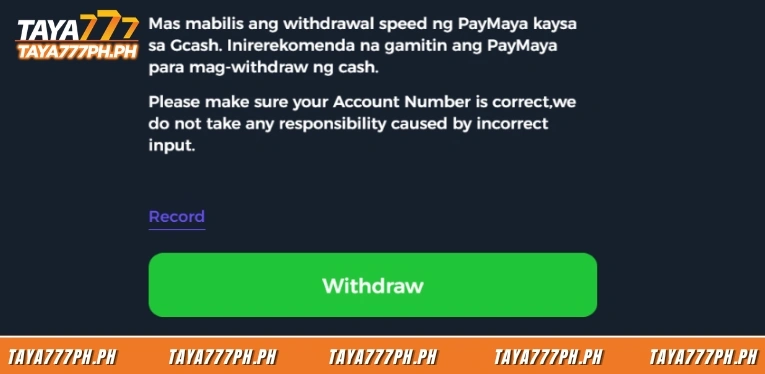
- Unlike GCash and PayMaya which process almost instantly, bank withdrawals require additional interbank processing time and are typically slower on weekends and public holidays. According to the recommendation on the platform interface, players who need to receive funds quickly should prioritise e-wallets while Bank Card is better suited for large transactions or players who do not use an e-wallet.
- Players must select the correct Bank Name, enter the exact Bank Number and a Beneficiary Name matching the registered account name, ensure their balance has been unlocked as a Withdrawable Amount and monitor the status via Withdrawal History after submitting the request. Leaving the Bank Name field empty will trigger a system error and entering incorrect details may cause the transaction to be rejected.
How to Taya777 Withdrawal to Bank Account
The Bank Card withdrawal process is carried out in the Withdraw section of the account. Here are the detailed steps:
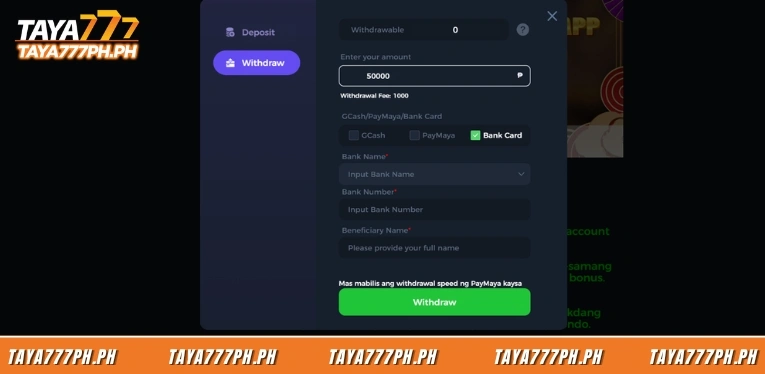
Step 1: Open the Withdraw tab and enter the amount
Players log in to their account, open the payment interface and select the Withdraw tab. In the Enter your amount field, players enter the withdrawal amount in peso, making sure it does not exceed the unlocked Withdrawable Amount.
Step 2: Select Bank Card as the withdrawal method
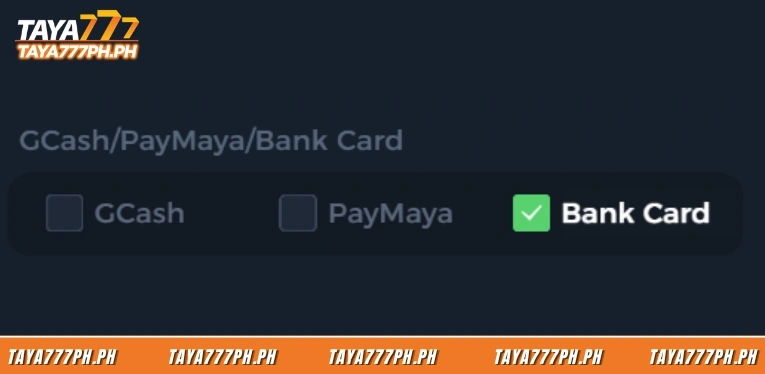
Under the GCash/PayMaya/Bank Card section, players tick the Bank Card option. The selected box turns to a green tick and the system displays the corresponding information fields for bank withdrawal.
Step 3: Choose the Bank Name from the dropdown
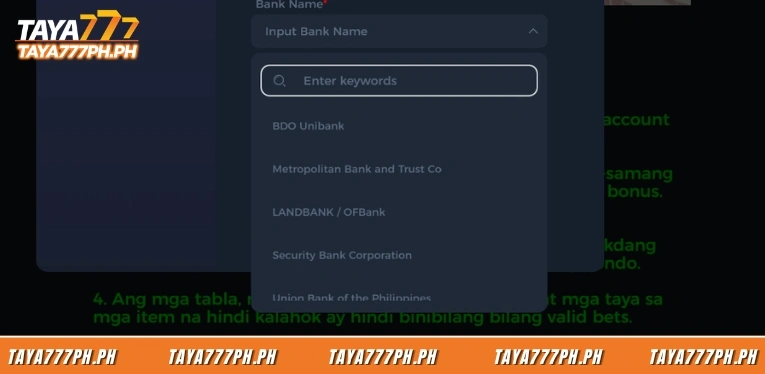
In the Bank Name field, players click the Input Bank Name box to open the bank list dropdown. Players can type a keyword into the Enter keywords box to quickly find their bank and then select it from the displayed list.
Step 4: Enter the Bank Number and Beneficiary Name
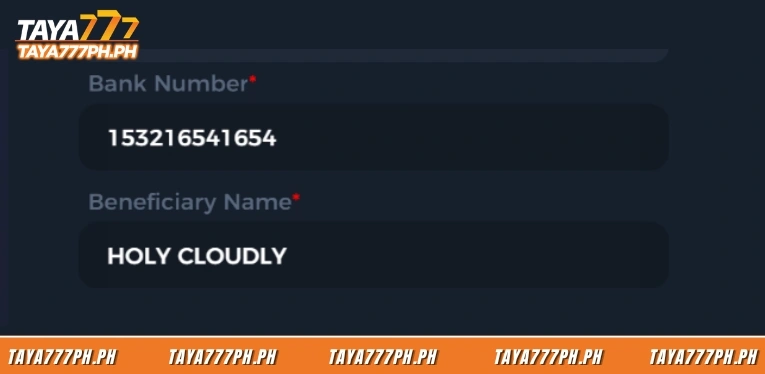
In the Bank Number field, players enter their full bank account number in the Input Bank Number box. In the Beneficiary Name field, players enter their full name matching the name registered on the Taya777 account. Both details are mandatory and leaving the Bank Name field empty will trigger the error Bank Name cannot be empty.
Step 5: Click Withdraw and wait for processing
Players click the green Withdraw button to submit the request. The transaction moves to a pending status and the time to complete depends on the interbank transfer system, which is typically slower than withdrawing via e-wallet.
List of supported banks and e-wallets
Taya777 supports nearly 60 banks and financial institutions in the Philippines within the Bank Name dropdown list, including major commercial banks, savings banks, rural banks and e-wallets. Players can type a keyword to quickly find their bank.
| Institution | Group | Notes |
| BDO Unibank | Major commercial | Largest bank in the Philippines |
| BPI Bank | Major commercial | Bank of the Philippine Islands |
| Metropolitan Bank and Trust Co | Major commercial | Metrobank |
| LANDBANK/OFBank | Major commercial | Government bank, supports OFWs |
| Security Bank Corporation | Major commercial | Private commercial bank |
| Union Bank of the Philippines | Major commercial | UnionBank, strong in digital banking |
| Philippine National Bank | Major commercial | PNB |
| China Banking Corporation | Major commercial | Chinabank |
| East West Banking Corporation | Major commercial | EastWest Bank |
| RCBC/DiskarTech | Major commercial | RCBC with DiskarTech app |
| Philippine Bank of Communications | Major commercial | PBCom |
| Development Bank of the Philippines | Major commercial | DBP, government bank |
| Asia United Bank Corporation | Major commercial | AUB |
| Maybank Philippines | Major commercial | Maybank branch |
| Standard Chartered Bank | Major commercial | International bank |
| CIMB Philippines, Inc | Major commercial | Digital bank |
| ING Bank N.V. | Major commercial | International bank |
| ALLBANK | Major commercial | Commercial bank |
| Philippine Savings Bank | Savings/Regional | PSBank |
| China Bank Savings | Savings/Regional | Savings bank |
| UCPB Savings Bank | Savings/Regional | Subsidiary of UCPB |
| United Coconut Planters Bank | Savings/Regional | UCPB |
| BDO Network Bank | Savings/Regional | BDO rural network |
| BanKo (A Subsidiary of BPI) | Savings/Regional | BPI subsidiary |
| Bangko Mabuhay | Savings/Regional | Regional bank |
| Bank of Commerce | Savings/Regional | Commercial bank |
| Camalig Bank | Savings/Regional | Regional bank |
| CARD Bank | Savings/Regional | Microfinance bank |
| CTBC Bank (Philippines) Corporation | Savings/Regional | CTBC branch |
| Dumaguete City Development Bank | Savings/Regional | Regional bank |
| Dungganon Bank | Savings/Regional | Microfinance bank |
| Equicom Savings Bank | Savings/Regional | Savings bank |
| ISLA Bank | Savings/Regional | Regional bank |
| Komo/EastWest Rural Bank | Savings/Regional | Komo digital bank |
| Legazpi Saving Bank | Savings/Regional | Savings bank |
| Malayan Bank Saving and Mortgage Bank | Savings/Regional | Savings bank |
| Mindanao Consolidated CoopBank | Savings/Regional | Cooperative bank |
| Netbank | Savings/Regional | Digital bank |
| Partner Rural Bank | Savings/Regional | Rural bank |
| Philippine Business Bank | Savings/Regional | PBB |
| Philippine Trust Company | Savings/Regional | Philtrust Bank |
| Producers Bank | Savings/Regional | Regional bank |
| Queenbank | Savings/Regional | Regional bank |
| Quezon Capital Rural Bank | Savings/Regional | Rural bank |
| Robinsons Bank Corporation | Savings/Regional | Robinsons Group subsidiary |
| Seabank | Savings/Regional | Digital bank |
| Veterans Bank | Savings/Regional | Philippine Veterans Bank |
| Wealth Development Bank | Savings/Regional | Development bank |
| GrabPay | E-wallet/Payment | Grab e-wallet |
| ShopeePay | E-wallet/Payment | Shopee e-wallet |
| Coins.ph | E-wallet/Payment | Popular digital money wallet |
| Bayad | E-wallet/Payment | Bill payment platform |
| Asenso | E-wallet/Payment | Financial services |
| JuanCash | E-wallet/Payment | Payment service |
| OmniPay | E-wallet/Payment | E-wallet |
| Starpay | E-wallet/Payment | E-wallet |
| TayoCash | E-wallet/Payment | E-wallet |
| USSC Money Services | E-wallet/Payment | Money transfer service |
| Cebuana Lhuillier Bank/Cebuana Xpress | E-wallet/Payment | Financial and money transfer services |
Processing time and notes for bank withdrawals
Bank withdrawal processing time at Taya777 is longer than e-wallets due to dependence on the interbank transfer system. Transactions are typically slower on weekends and public holidays in the Philippines such as Christmas, New Year and Holy Week when bank processing speeds are reduced.
Players should keep the following important points in mind when withdrawing via bank:
- Select the correct Bank Name from the dropdown and type a keyword to search quickly if the list is long. Leaving this field empty will trigger the error Bank Name cannot be empty.
- Enter the Bank Number accurately as the platform does not take responsibility for transactions that fail due to an incorrect account number entered by the player.
- Ensure the Beneficiary Name matches the name registered on the Taya777 account and the name on the bank account, in line with the strict name-matching requirement.
- Complete the wagering requirement to unlock the Withdrawable Amount before withdrawing as the system will only allow the unlocked portion to be withdrawn.
- Prioritise withdrawing on business days for faster processing and avoid weekends and public holidays.
How to track bank withdrawal status
After submitting a bank withdrawal request, players monitor the progress via the Record section by clicking the Record link below the withdrawal form and then selecting the Withdrawal History tab.
The Withdrawal History interface displays a data table with five columns: ID is the transaction code, Amount is the withdrawal sum, Time is when the request was made, Status is the processing state and Detalye contains the transaction details. Players filter transactions by time range by selecting a start date and end date then clicking the Search button to display the results.
Taya777 withdrawal to bank account are carried out in the Withdraw section using the Bank Card method, supporting nearly 60 banks and e-wallets in the Philippines from BDO, BPI and Metrobank to GrabPay, ShopeePay and Coins.ph. Players must select the correct Bank Name and enter the exact Bank Number and Beneficiary Name matching the registered account name to avoid the transaction being rejected. As processing time is longer than e-wallets, players who need funds quickly should prioritise GCash or PayMaya and should monitor the status via Withdrawal History after submitting the request.

Barbie Imperial is a Senior Content Strategist at TAYA777, specializing in online casino news, detailed gaming guides, and sports betting insights for the Philippine market. With a proven track record in the iGaming industry, she is committed to providing reliable, accurate information that helps players bet with clarity and confidence.